
No Commercial Photography on Airbnb: What It Means
Table of contents
Key Takeaways
- No commercial photography on Airbnb means guests can take personal photos, but cannot shoot images or video intended to earn money without the host’s documented permission.
- Airbnb’s ground rules for guests state that guests “should not participate in film or photography that is intended for commercial use or profit, without documented permission from the host.”
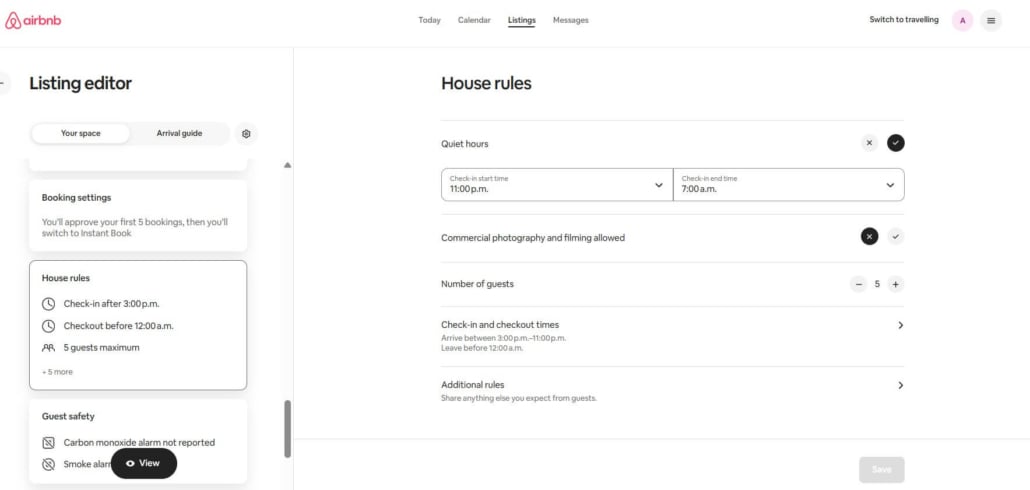
- Hosts control this through a standard house rule called “Commercial photography and filming,” which they set to Allowed or Not allowed in the listing editor under House rules.
- Permission has to be documented, so ask in the Airbnb message thread and get a written yes before you book.
- Hosts who approve a shoot can charge for it, but the money has to move on Airbnb, since requesting or receiving payments outside the platform is prohibited.
- AirCover’s host damage protection covers the guest and their invitees, and the terms exclude anyone contracted through Airbnb to provide host services, so a paid crew is not something hosts should assume is covered.
The House Rule Behind the Phrase
No commercial photography on Airbnb means you may take personal photos in the home, but you may not shoot images or video intended to make money without the host’s documented permission. Airbnb’s ground rules for guests state that guests “should not participate in film or photography that is intended for commercial use or profit, without documented permission from the host.”
No commercial photography on Airbnb means you may take personal photos in the home, but you may not shoot images or video intended to make money without the host’s documented permission. Airbnb’s ground rules for guests state that guests “should not participate in film or photography that is intended for commercial use or profit, without documented permission from the host.”
That single line does a lot of work. It does not ban cameras, and it does not stop you photographing your breakfast or your dog on the sofa. What it targets is intent, specifically whether the resulting images are meant to sell something or generate income.
Hosts control the setting themselves. In the listing editor, go to Arrival guide and then House rules. There Airbnb offers a standard rule labelled “Commercial photography and filming,” alongside the settings for pets, events, smoking and quiet hours. Set to Not allowed, it appears in the house rules a guest agrees to at booking.
Airbnb does enforce the ground rules. Its stated actions include informing guests about the policy and issuing warnings. Airbnb adds that “when repeated or severe violations of these ground rules are reported, guests may also be suspended or removed from our community.”
Allowed or Not Allowed: Where Airbnb Draws the Line
Most confusion comes from a fair question: does a phone count? The test is not the equipment, and it is not whether a professional pressed the shutter. It is what the pictures are for.
| What you plan to shoot | Commercial under Airbnb’s rule? | What to do |
|---|---|---|
| Holiday snapshots, family photos, video calls | No | Nothing. Shoot away |
| Trip photos on your own social account, unpaid | No | Nothing, though a quick note to the host is polite |
| A sponsored or paid post featuring the property | Yes | Get documented permission first |
| Product, e-commerce or catalogue images | Yes | Get permission, agree a fee, confirm crew numbers |
| Monetised YouTube or TikTok content shot in the home | Yes | Get permission, especially if anyone extra attends |
| A hired photographer shooting portraits for your own use | No, but it brings extra people | Tell the host who is coming and when |
| Film, TV or advertising with a crew and lighting rigs | Yes | Written agreement, insurance, and a location fee |
One row deserves a second look. Paying a photographer for personal portraits is not commercial under Airbnb’s wording, because the images are not intended for profit. It still brings an extra person and equipment into someone’s home, so disclose it anyway. The maximum guest count rule applies regardless of what the camera is doing.

How to Ask a Host for Permission to Shoot
Documented is the key word. A verbal yes at the door protects nobody, and a message sent on Instagram sits outside the platform where Airbnb cannot see it. Keep the whole conversation in the Airbnb message thread instead.
Ask before you book rather than after. Airbnb lets hosts cancel without adverse consequences when they have proof a guest intends to break a house rule included in the listing details. A surprise crew on arrival is therefore the worst possible sequence.
A useful request covers six things:
- What the shoot is for, and who the client or brand is
- The exact date and hours you need the space
- Total headcount, including crew, talent, and assistants
- Equipment you are bringing, particularly lighting stands and tripods
- Which rooms you want to use, and whether anything will be moved
- Whether the property or its address will be identifiable in the final images
Send that as one message. Vague answers to direct questions are the strongest signal a host has, and specific answers are what get a yes.
If the host agrees, ask them to confirm the terms in writing in the same thread: approved hours, approved headcount, the fee, and anything off limits. That thread is your documented permission, and it is also the record either side would rely on in a dispute.
How to Request Photography From Airbnb
Two different things get called Airbnb photography, and hosts searching for one often land on the other.
The Pro Photography Program for listing photos
Airbnb runs a professional photography program for hosts who want better listing images. According to Airbnb’s program page, requests run through Elevate, which Airbnb describes as the tool it uses to connect hosts and photographers. The booking form opens outside airbnb.com, so do not be thrown when the page changes domain. You pay nothing upfront, and the cost is subtracted from future payouts once the new images are live. Delivery is between 15 and 25 retouched images, depending on the size of the property. On average, those images go live within one week of the shoot.
Airbnb’s help centre adds the practical detail. Photographers are independently contracted and have the final say on which assignments they accept. Shoots happen only during daylight hours, for natural light. The service is also not offered everywhere. Airbnb also documents an alternative route of emailing photography@airbnb.com for a price quote with the listing URL included. Worth knowing before you book: Airbnb offers one professional photo shoot per listing, and it is not refundable once it has started.
Photography booked as a service on Airbnb
Separately, Airbnb now lists independent photographers as bookable services in cities including Rome, Paris, Seattle, and Montreal. Guests book a session the way they would book anything else on the platform.
This is where the house rule and the service marketplace meet. A booked session producing personal images for the traveller is not commercial under Airbnb’s wording, but the host’s rule still governs what happens inside their home. Airbnb’s guidance for photography service providers tells them to explain any limitations affected by the selected location and to sort out licences or permits where public land is involved.
When hiring your own photographer makes more sense
Airbnb’s program has four limits worth knowing before you rely on it. You get one professional shoot per listing, and it is not refundable once it has started. Photographers choose which assignments to accept. The service is not available in every area. And the cost still comes out of your payouts, so it is not free, just deferred.
That matters most when your listing changes. Refurnish the living room, add a hot tub, or want winter shots to sit alongside summer ones, and Airbnb will not send someone back for a second pass. Hosts in that position hire directly, which is why Airbnb photography sits alongside listing optimization and pricing in most management packages, MasterHost’s included.
Book your own photographer when you expect to reshoot, when your city falls outside Airbnb’s coverage, or when you want the same images working across Booking.com and your own site. Use Airbnb’s program when the listing is new, the space is finished, and you would rather not pay anything upfront.
Should You Allow Commercial Photography, and What to Charge
Blocking every shoot is simple, and it also turns away a category of booking that fills midweek dates leisure travellers skip. Saying yes without a framework is worse. The middle path is to leave the rule set to Not allowed and approve individual requests in writing, case by case.
Ask three questions before approving:
- How many people are actually coming?
- How long are they there, and does that run past your quiet hours?
- And would your building, strata, or insurer object if they knew?
That last one matters more than hosts expect. A production in a condo generates noise, lifts traffic, and makes neighbours in the corridor ask questions. That is exactly the pattern that produces noise complaints and strata pressure long after the crew has gone.
Pricing it without guessing
Airbnb publishes no benchmark for location fees, and any percentage you see quoted as a standard is somebody’s opinion rather than a platform rule. Build your number from costs you can actually name.
| Cost driver | What to look at | Why it belongs in the fee |
|---|---|---|
| Time | Hours booked versus a normal stay | A studio day is not a night’s sleep |
| People | Crew above your standard occupancy | More bodies, more wear, more risk |
| Turnover | Extra cleaning and reset time | Furniture gets moved, floors get marked |
| Exclusivity | Dates you cannot sell to anyone else | You are selling a location, not a bed |
Then sanity-check the total against the comparable spaces list for on-location marketplaces in your city. That gives you a real market reference rather than a made-up multiplier.
Collecting the fee the right way
Airbnb’s off-platform and fee transparency policy is blunt on this point: “Requesting, sending, or receiving payments outside of Airbnb is prohibited.” The narrow exceptions it lists cover software-connected hosts, hotels, and taxes Airbnb does not collect, none of which help an ordinary host with a shoot fee. An e-transfer is not a shortcut; it is a policy breach.
Use the Resolution Center instead. Among the things a host can request money for, Airbnb lists optional fees, including “guest access to elected amenities or upgrades.” That is the closest documented category to a location fee. Agree on the amount in the message thread first, then send the request. Note that changes to nights, guest count, or pet count go through Change Reservation rather than the Resolution Center.
Write the position into your listing too. A line in your Airbnb house rules saying commercial shoots need advance approval and carry a separate fee does more work than any conversation after check-in.
What AirCover Does and Does Not Cover During a Shoot
AirCover for Hosts provides up to $3 million USD in host damage protection and $1 million USD in host liability insurance. The liability figure is a total limit per Airbnb stay. Damage protection covers damage caused by the guest and their invitees, and it excludes normal wear and tear and routine checkout cleaning.
One definition matters enormously here. The Host Damage Protection Terms define an invitee as someone the responsible guest invites to the property. They then exclude anyone who “has contracted through Airbnb to provide Host Services” and is there to provide them. A photographer booked through Airbnb’s own services marketplace therefore sits outside that definition, and Airbnb’s coverage documents say nothing at all about paid film crews. Treat crew damage as uncovered until your own insurer tells you otherwise.
Deadlines are the other trap, and Airbnb states two. The help centre tells hosts to file a reimbursement request in the Resolution Center within 14 days of the responsible guest’s checkout. The guest then has 24 hours to respond. The Host Damage Protection Terms set 30 days from checkout for filing the payment request form itself. Work to the shorter figure, because waiting until the next turnover to notice a scratched floor is how a valid claim dies.
So document the space before the crew arrives. Photograph floor corners, upholstery, walls, and anything fragile, then repeat the sequence afterwards. Hosts who run shoots regularly should read the fine print on what AirCover actually covers. Then speak to a short-term rental insurer, because platform protection is no substitute for a policy that contemplates commercial activity.
One more practical note for Canadian hosts. The permit question turns on public impact rather than on whether the crew leaves the unit. The City of Vancouver requires a film permit “if filming is occurring inside a building/home and there is impact to the public from lights, noise from trucks, etc.” Most filming and photography on city property and parks needs one too. A shoot confined to a single private property, in compliance with other city by-laws and with no impact outside it, generally falls outside that. Confirm with your own municipality before a larger booking, and treat this as general information rather than legal advice.
Screening requests, papering the terms, and documenting the property are the whole job, and professional Airbnb management exists to carry exactly that load.
Frequently Asked Questions
1. What does “no commercial photography” mean on an Airbnb listing?
It means the host has not given blanket permission for film or photography intended for commercial use or profit. Personal photos are unaffected. If your shoot is meant to earn money, you need documented permission from the host before it happens.
2. Can I take photos inside an Airbnb for Instagram?
Yes, if the post is personal and nobody is paying you. A sponsored post, an affiliate campaign, or any content produced under a brand agreement is commercial, so ask the host first and keep the answer in the Airbnb message thread.
3. Do I need permission to film a YouTube video in an Airbnb?
If the channel is monetised or the video is sponsored, treat it as a commercial and get documented permission. Casual travel vlogging with no payment attached is usually fine, though telling the host costs nothing and prevents an awkward conversation.
4. How do I ask an Airbnb host for permission to do a photo shoot?
Message the host before booking with the purpose, date, hours, total headcount, equipment, and rooms you need. Ask them to confirm approval and any fee in writing in the same thread, since Airbnb’s rule requires documented permission.
5. Can Airbnb hosts charge extra for a photo shoot?
Yes, but the money has to move on Airbnb. Agree on the amount in the message thread, then send a Resolution Center request, where Airbnb lists optional fees, including guest access to elected amenities or upgrades. Requesting or receiving payments outside the platform is prohibited.
6. How do I request photography from Airbnb for my listing?
Start from Airbnb’s Pro Photography Program page. It routes the request through Elevate, the tool Airbnb uses to connect hosts and photographers, on a site outside airbnb.com. You pay nothing upfront, and the cost comes out of future payouts. Availability varies by city, and it is one shoot per listing.
7. Does AirCover cover damage caused by a film crew?
Do not assume so. Host damage protection covers the guest and their invitees, and the terms exclude anyone contracted through Airbnb to provide host services. Paid crews are not addressed in Airbnb’s coverage documents, so carry short-term rental insurance that contemplates commercial activity.